
How Can We Help?
Strikepay QR Code Stickers (Mirror Stickers)
This guide explains how Strikepay QR Code Mirror Stickers work alongside a Salon Guru–built portal landing page, including setup, ordering, and costs. These QR codes are not just for tipping. They link to a custom portal page on the salon’s website that can be used for a range of in-salon actions.
This is an internal Salon Guru knowledge article and will be updated as we roll this out across more salons.
What Are Strikepay QR Code Stickers?
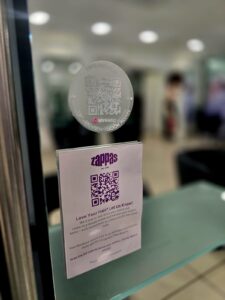 Strikepay QR Code Stickers are placed at mirrors or stations and scanned by clients using their phone.
The QR code links to a portal page we create on the salon’s website. Think of this page as a Linktree-style hub, designed specifically for clients while they’re in the salon.
What Is the Portal Used For?
The portal can include as many buttons as needed, all managed by Salon Guru. There’s no fixed structure - it should always be tailored to what the client wants to prioritise.
Typical uses include:
- Tipping via Strikepay
- Leaving a Google review
- Drinks menus
- Special offers or promotions
- Booking links
- Loyalty schemes
- Retail or product promotions
- Useful salon information
This should always be discussed with the client before setup so the portal supports their goals, not just ours.
Creating the Portal Landing Page
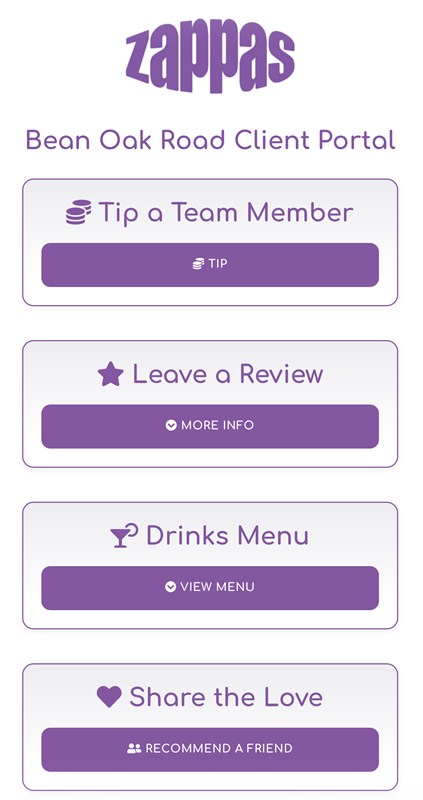 To set up the portal we create a standard page on the client’s website
This usually includes:
- The salon logo
- A short introductory blurb (optional)
- Clear buttons linking to each chosen action
- This takes around 30 minutes of client budget
This is a one-off setup and becomes the central page the QR code points to.
Example layout (for reference): https://www.zappas.co.uk/bean/
The QR code always links to this portal page, rather than directly to Strikepay. This gives us flexibility to update buttons, links, or priorities later without replacing stickers.
Ordering the Stickers
Stickers are ordered directly from Strikepay using the link https://checkout-s.storedpay.co/l/Strikepay/All-products/1079283-8193d57d-2
Stickers are only available in packs of 20.
When ordering, we provide Strikepay with the URL of the portal page we’ve created.
QR Code & Sticker Setup
Once ordered, Strikepay handles the rest:
- They generate a unique QR code linked to the portal URL
- Stickers are printed with that QR code
- The pack is delivered ready to use
No further setup is required at salon level.
Strikepay Tipping Setup (If Included)
If tipping is included as part of the portal:
- Strikepay sets up the salon within Striketip
- Salon branding (logo and styling) is applied
- A tipping page is created
- The tipping page is added as a button within the portal page
Team Member Setup (To Be Confirmed)
We’re currently confirming with Strikepay:
- Whether they add team members initially
- Whether individual stylists then complete their own sign-up
Phil is liaising with Strikepay on this, and this section will be updated once confirmed.
Delivery & In-Salon Use
- Stickers are delivered directly to the client
- Everything arrives fully set up
- The salon team simply attaches them at mirrors, stations, or other agreed locations
Costing & Sticker Allocation
- €40 per pack
- 20 stickers per pack
- Charged by Strikepay and paid directly by the client
- There’s no option to order smaller quantities.
At present, salons may receive a limited number of stickers free of charge when:
- They are using Striketip for tipping, and
- This has been approved internally
- This is entirely at our discretion.
Always speak to Phil before confirming free stickers with a client. Nothing should be promised without approval.
Confirm Quantities Before Ordering
Before ordering stickers, confirm with the client the number of styling stations and whether stickers are also wanted at:
- Reception
- Wash areas
- Private rooms
- Whether they want spares
This avoids under-ordering or unnecessary extra packs.
Strikepay also offers other QR and NFC products, including tap-style options where the code is picked up when a phone is nearby.
These are paid for directly by the client and options can be viewed here https://checkout-s.storedpay.co/l/strikepay/all-products
SG Client Manager Notes
- This is a client engagement tool, not just a tipping solution
- We control the portal page and can update it at any time
- Portal setup requires approx 30 minutes of client budget
- Free sticker allocations must be approved first
- The portal works best when planned properly with the client